Recently, I prepared NetworkManager 0.8.1 packages (many of you seemed to like them, so I updated the available ones also to 0.8.1beta2).
Nevertheless, it seems to be un-intuitive on how to initiate a connection using this new feature, so I’ll try to provide a short step-by-step here on how I did get it to work using my very old Nokia 6300 (yes, that’s actually a pure telephone).
Make sure your bluetooth applet is started (if not, launch bluetooth-applet), open it’s menu
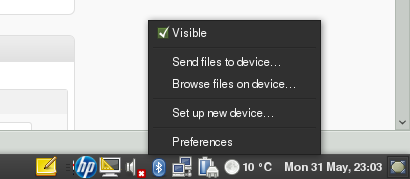
and select preferences
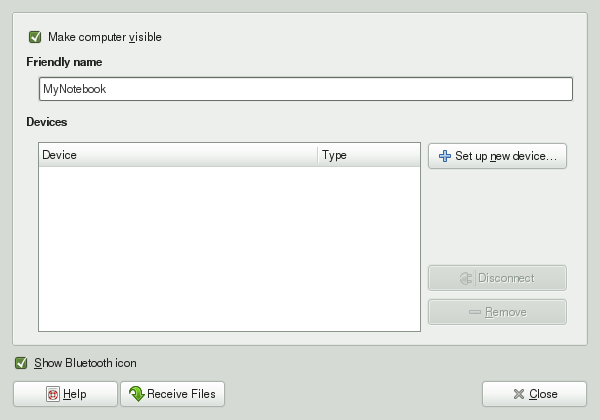
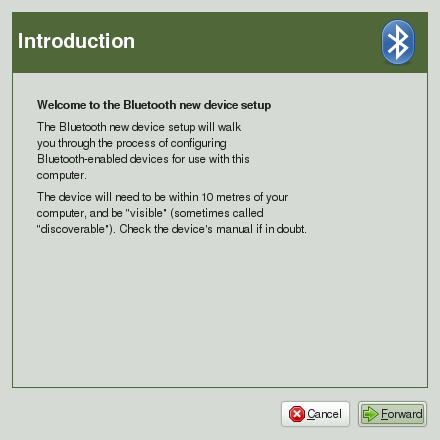
In case your phone is already listed as paired, I’m afraid you have to remove it (I did not find a way to change options of an already paired device).Otherwise, you can go straight ahead and configure a new device:
If your phone has bluetooth enabled, it should show up in the list like:
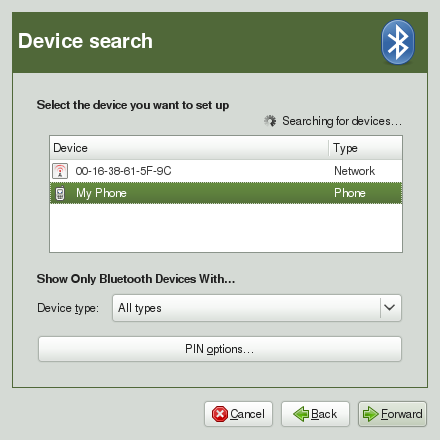
Next, bluetooth-wizard will present you with a 6 digit combination that you have to enter on your phone keyboard, to confirm that you do want these devices to pair together.
The ‘setup complete’ is only almost true, as it contains the for us most important options:
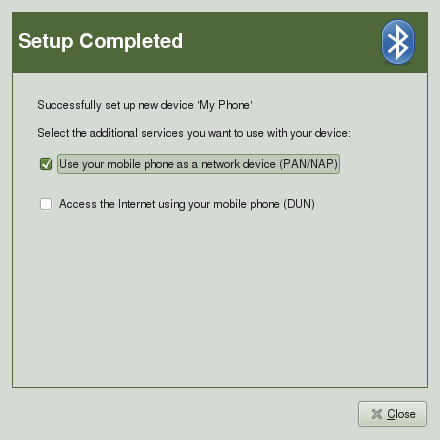
For my phone, I have to select PAN, which in the background of the system created a /dev/rfcomm0 device and binds it to NetworkManager (via ModemManager), as can be seen in the list of available connections in Network Manager:
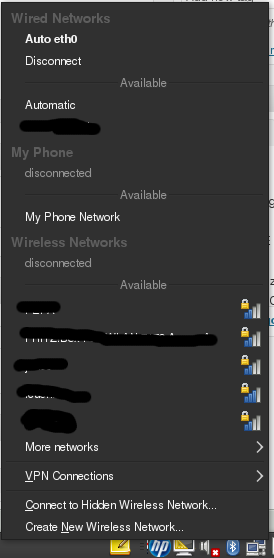
When selecting it (I only had success when not wired, you might have more luck) NM initiates a connection and the symbol in the tray area changes to an antenna:  and I have a working connection to the internet through the bluetooth adapted of my phone.
7 responses to “NetworkManager 0.8.1 How-To”
Thx for the info Dominique. I’m not getting the final “Setup Completed” panel that enables you to toggle on “Use your mobile phone as a network device (PAN/NAP)”.
What might I be missing here? I checked my networkmanager rpms and they match the latest revs from your repo and my gnome-bluetooth rpms are those from the GNOME Factory for 11.2.
My phone is a treo 700P.
Any ideas/suggestions are appreciated.
thx.
Wendell
Try starting bluetooth-wizard from a console and look out for any kind of errors.
Hi Dominique:
OK, figured out what was going on. I shutdown bluetooth-applet and started it from the shell. It was launching the bluetooth-wizard and encountering a problem with the /usr/share/mobile-broadband-provider-info/serviceproviders.xml not being found. I had not installed the rpm containing this file. This causes the wizard to abort. Here is the output from the applet now:
** Message: has_config_widget 00:07:E0:BD:30:30 DialupNetworking
** Message: has_config_widget 00:07:E0:BD:30:30 OBEXObjectPush
** Message: has_config_widget 00:07:E0:BD:30:30 Headset_-_AG
** Message: has_config_widget 00:07:E0:BD:30:30 HandsfreeAudioGateway
** Message: has_config_widget 00:07:E0:BD:30:30 DialupNetworking
** Message: has_config_widget 00:07:E0:BD:30:30 OBEXObjectPush
** Message: has_config_widget 00:07:E0:BD:30:30 Headset_-_AG
** Message: has_config_widget 00:07:E0:BD:30:30 HandsfreeAudioGateway
** Message: Default Bluetooth adapter is powered
** Message: dun_start: starting DUN device discovery…
** Message: dun_start: calling Connect…
** Message: dun_start: finished
** Message: dun_connect_cb: processing Connect reply
** Message: dun_connect_cb: new rfcomm interface ‘/dev/rfcomm0’
** Message: dun_connect_cb: finished
** Message: modem_added: (/org/freedesktop/ModemManager/Modems/2) modem found
** Message: modem_added: (/org/freedesktop/ModemManager/Modems/2) calling GetAll…
** Message: modem_get_all_cb: (/org/freedesktop/ModemManager/Modems/2) processing GetAll reply
** Message: modem_get_all_cb: (/org/freedesktop/ModemManager/Modems/2) starting the mobile wizard
** Message: modem_get_all_cb: finished
** Message: wizard_done_cb: mobile wizard done
** Message: wizard_done_cb: adding new setting to GConf
** Message: wizard_done_cb: success!
** Message: modem_removed: (/org/freedesktop/ModemManager/Modems/2) modem removed
and lo and behold NetworkManager applet now shows my bluetooth connection to my service provider in the list!! wahooey!
thx for your help.
Wendell
Hello Team,
I got everything upto this
** Message: wizard_done_cb: success!
** Message: modem_removed: (/org/freedesktop/ModemManager/Modems/2) modem removed
but my blutooth connection is not showing in NM. Please advise ?
Thanks in advance
Vipindas V G
Hi:
Well, upgraded to 11.3 and built the released versions of NetworkManager, NetworkManager-gnome and ModemManager and seemed to have broken my connection again :(.
Not receiving the checkbox at the end of the pairing process that enables you to select the phone as your mobile connection. No error messages are displayed.
Do you know what specifically enables the nm-applet plugin to offer the DUN capability during the pairing process?
thx.
Wendell
OK, finally resolved it. The ModemManager-0.4 version in factory was the culprit. Backed off the 0.4-1 version from gnome.org and it works.
The only reason you would need to use a VPN connection to your work is if you need to be able to access resources at your work like files or databases. A VPN basically gives you secure network access to your work without being on your work computer. A VPN is not something you will just be able to setup at home on your own and connect to your work. You will have to coordinate with your IT department to set this up.